Look, if you're running multiple accounts, you already know a regular browser won't cut it. Let's talk about which antidetect browsers are actually worth your time — and why proxies matter more than you think.
So What's an Antidetect Browser, Anyway?
In simple terms, it's a browser that lets you create separate profiles, each with its own unique fingerprint. Websites think each profile is a completely different person on a completely different device.
People use them for all kinds of things:
- Running multiple social media or ad accounts
- Affiliate marketing across platforms
- E-commerce and dropshipping from multiple storefronts
- Web scraping without getting blocked
- Ad verification and competitive research
If you've ever had an account banned "for no reason" — chances are your fingerprint or IP gave you away. That's exactly what these browsers solve.
The Browsers Worth Looking At
Multilogin

The OG of the antidetect world. It's been around the longest and it shows — rock-solid fingerprint masking, two browser engines (Chromium and Firefox-based), and the best team collaboration features out there. If you're running a serious operation with a team, this is hard to beat.
What's good: Mature product, excellent fingerprint quality, great API support for automation (Selenium, Puppeteer, Playwright). What's not: It's the priciest option, and can slow down if you're managing hundreds of profiles at once.
GoLogin

Honestly, GoLogin hits a sweet spot for most people. It's straightforward to set up, has a clean interface, and even offers cloud-based profiles so you can access your stuff from any device. There's a free tier too, which is nice for testing the waters.
What's good: Easy to learn, affordable, mobile app available, cloud profiles are a lifesaver. What's not: No Firefox engine, and the free plan is pretty bare-bones.
AdsPower

If you're on a budget but still want serious features, AdsPower is hard to ignore. It has both Chromium and Firefox engines, and here's the kicker — it comes with built-in RPA automation. That means you can automate repetitive tasks without writing a single line of code.
What's good: Super affordable, no-code automation, great for Facebook and TikTok workflows specifically. What's not: The interface feels a bit cluttered, and fingerprint masking isn't quite on Multilogin's level.
Dolphin Anty

This one's become the go-to for affiliate marketers, and for good reason. It's got a built-in cookie bot, a really clean interface, and a solid community behind it. If you're in the affiliate space, your peers are probably already using this.
What's good: Tailored for affiliates, nice UI, active community and support. What's not: Chromium-only — no Firefox engine. Advanced fingerprint tweaking is limited.
Incogniton

The underdog that quietly gets the job done. Incogniton offers bulk profile creation, a handy "paste as human typing" feature, and solid Selenium/Puppeteer integration. It won't blow your mind, but it's reliable and won't break the bank either.
What's good: Budget-friendly, bulk creation saves time, good automation support. What's not: Smaller user base, updates come less frequently.
Quick Comparison
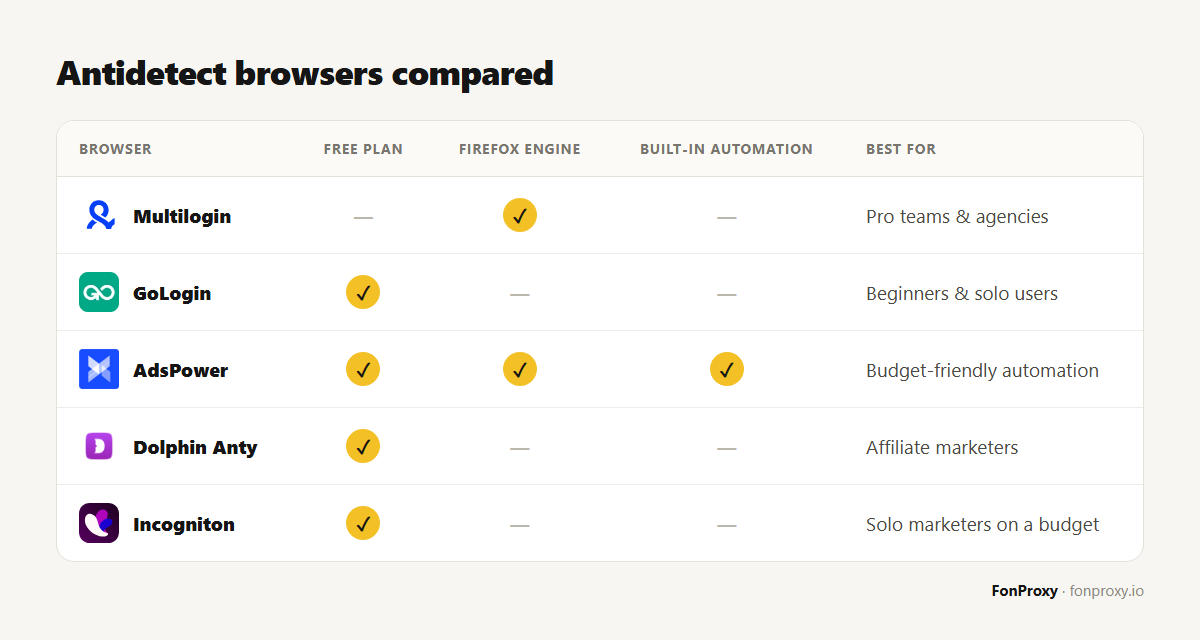
| Browser | Free Plan | Firefox Engine | Built-in Automation | Best For |
|---|---|---|---|---|
| Multilogin | ❌ | ✅ | ❌ | Pro teams & agencies |
| GoLogin | ✅ | ❌ | ❌ | Beginners & solo users |
| AdsPower | ✅ | ✅ | ✅ | Budget-friendly automation |
| Dolphin Anty | ✅ | ❌ | ❌ | Affiliate marketers |
| Incogniton | ✅ | ❌ | ❌ | Solo marketers on a budget |
Here's the Thing Nobody Tells You: The Browser Is Only Half the Equation
You can have the fanciest antidetect browser on the planet, but if all your profiles are running on the same IP address — you're toast. Platforms see right through it.
Every single browser profile needs its own proxy. No exceptions.
Think about it — if a website sees 30 "different users" all logging in from the same IP, that's a massive red flag. Game over.
Which proxy type should you go with?
| Proxy Type | Trust Level | Best For |
|---|---|---|
| Datacenter | Medium | Scraping, low-risk stuff |
| Residential | High | Account creation, social media |
| Mobile | Very High | High-trust platforms like Facebook & Google |
My Honest Take: Go Residential for Account Creation
I've seen people try to save money with datacenter proxies for account sign-ups. It almost never ends well. Platforms like Facebook, Google, and TikTok are incredibly good at detecting datacenter IPs — your accounts will get flagged within days, sometimes hours.
Residential proxies are different. They use real IP addresses from actual internet service providers. To any website, you look like a regular person browsing from home. That's exactly what you want.
Here's why they matter for account creation specifically:
- 🏠 Real IPs from real ISPs — you blend in with normal traffic
- 🌍 Geo-targeting — pick the exact country or city you need
- 🛡️ Lowest ban rate of any proxy type
- 🔄 Sticky sessions — keep the same IP for as long as you need during sign-up
If you're creating accounts and want them to actually last, don't cut corners on proxies. Residential is the way to go.
👉 Check Out Residential Proxy Plans for Safe Account Creation
Tips That'll Save You a Lot of Headaches
- One proxy per profile. Always. No sharing, no shortcuts.
- Match your location settings. If your proxy is in Germany, your browser timezone, language, and locale should be German too.
- Use residential for the sign-up phase. This is when platforms scrutinize you the most.
- Don't rush. Warm up new accounts slowly — post gradually, add friends over time, don't blast ads on day one.
- Be consistent. Once you set a fingerprint for a profile, leave it alone. Changing it mid-use is suspicious.
- Check for leaks. WebRTC and DNS leaks can expose your real IP even through a proxy. Test regularly.
Common Questions
Can I just use free proxies? Please don't. Free proxies are shared by thousands of people, they're already blacklisted everywhere, and many of them log your data. Your accounts will get banned, and you might compromise your own security in the process.
How many proxies do I need? One per profile. Running 50 accounts? You need 50 proxies. It's that simple.
I'm new to this — what combo should I start with? GoLogin or AdsPower paired with residential proxies. It's affordable, effective, and won't overwhelm you with complexity.
Do I need a different proxy type for each platform? Not necessarily, but for high-trust platforms (Facebook, Google), residential or mobile proxies are strongly recommended. For scraping or less strict sites, datacenter can work fine.
Ready to Set Things Up Properly?
An antidetect browser without good proxies is like a sports car without fuel. You've got the tool — now give it what it needs to actually work.
🔥 Browse Proxy Plans — Find What Works for You
Millions of clean IPs worldwide. Works with every antidetect browser on this list. Flexible plans, instant setup — just plug in and go.
Updated April 2026 · Have questions? Drop us a message, we're happy to help.
Comments 0
Log in to your FonProxy account to join the discussion.
Log in to commentNo comments yet. Be the first to share your experience.