

Kameleo is an antidetect browser. Each profile has its own browser fingerprint, its own cookies and its own storage. You can run desktop and mobile-looking profiles side by side on one computer.
A unique fingerprint does not help much if every profile comes from the same IP address. Sites see the shared IP and connect the profiles. One proxy per profile solves that. This guide shows how to add FonProxy proxies to Kameleo.
Before you start
You need:
- Kameleo installed and signed in.
- A FonProxy account with an active proxy. To try first, use the free test. Plans are on the pricing page.
- The right product.
Two FonProxy options suit Kameleo profiles:
- Rotating residential with a sticky session. One IP per profile for 15, 30 or 60 minutes, with the country set in the username. Kameleo's own advice is to prefer residential IPs over datacenter ones.
- Static IP products (static/ISP, private, mobile per-IP). Each IP has its own port and keeps its country for the whole rental period. Good when a profile should keep the same IP over weeks, which Kameleo also recommends.
Kameleo's proxy manager supports HTTP/HTTPS and SOCKS5. Both work with FonProxy.
Get your FonProxy credentials
Open the FonProxy dashboard. Every proxy you own is one row — host, port, username and password. Hit Copy next to it and you are set.
- Host & port — the same host for all proxies, a different port per proxy.
- Username — your base username, with country or sticky-session suffixes if you need them.
- Password — unless you added your IP to the FonProxy whitelist, in which case leave it empty.
Build the proxy login
Open the Proxies page in the FonProxy dashboard. The copy buttons give you two line formats:
host:port:username:passwordusername:password@host:port
The second one is the connection string format Kameleo reads. Here are the parts:
| Field | Example value |
|---|---|
| Host | fon.ac |
| Port | 20001 (one port per proxy, starting at 20001) |
| Username | u_4f1c92ab07de-t_30-s_iall27-c_us |
| Password | YOUR_PASSWORD |
For rotating products, the base username u_4f1c92ab07de can carry two options:
- Country:
-c_us. Use any ISO code, such asgb,de,brorjp. Leave it out for any country. - Sticky session:
-t_30-s_iall27.t_sets how many minutes the IP is held (15, 30 or 60).s_is a session id you choose. Without it, the IP changes on every request.
For each Kameleo profile, use a sticky session with its own session id. Set the country to the account's region.
Static IP products use the base username with no suffixes, plus the port of the IP you want.
If you would rather not use a password, add your computer's IP to the whitelist in the FonProxy dashboard. Then leave the username and password empty.
Step by step with screenshots
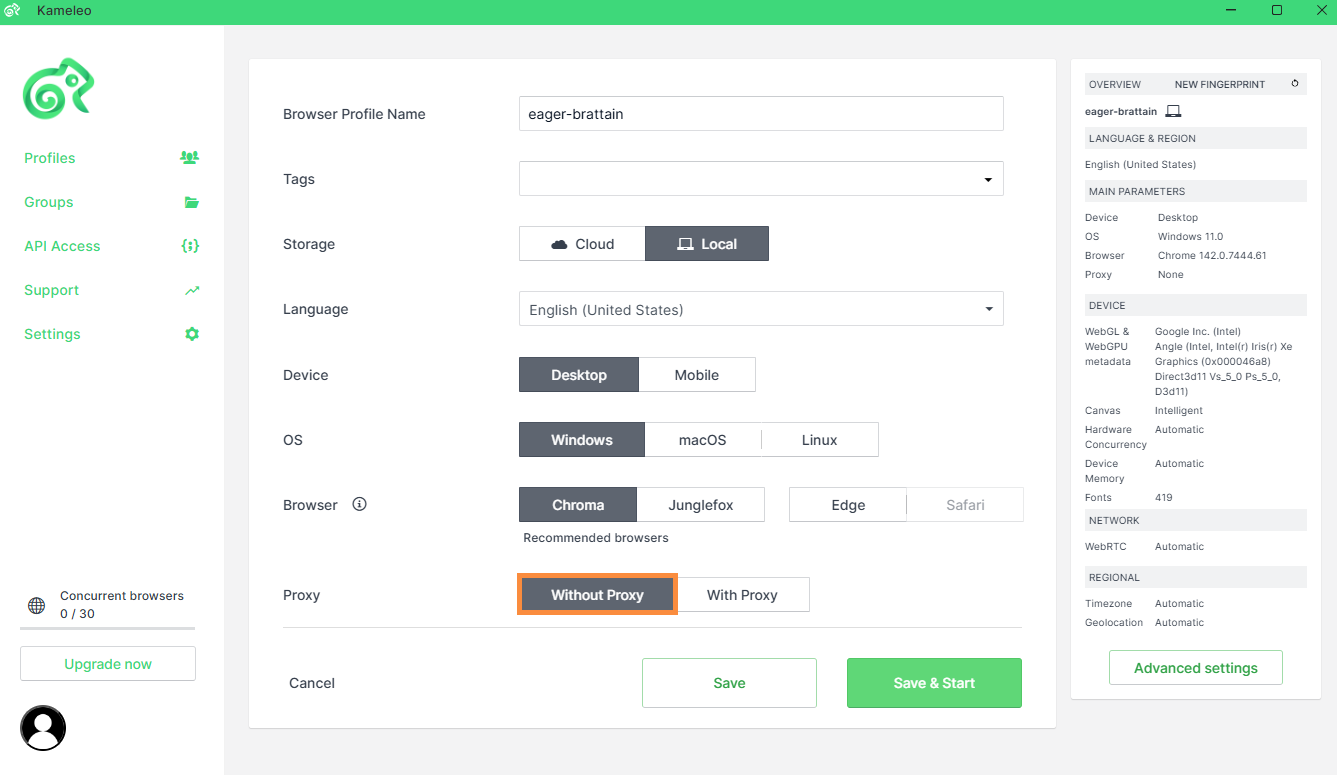 Open the built-in Proxy manager in the Kameleo app.
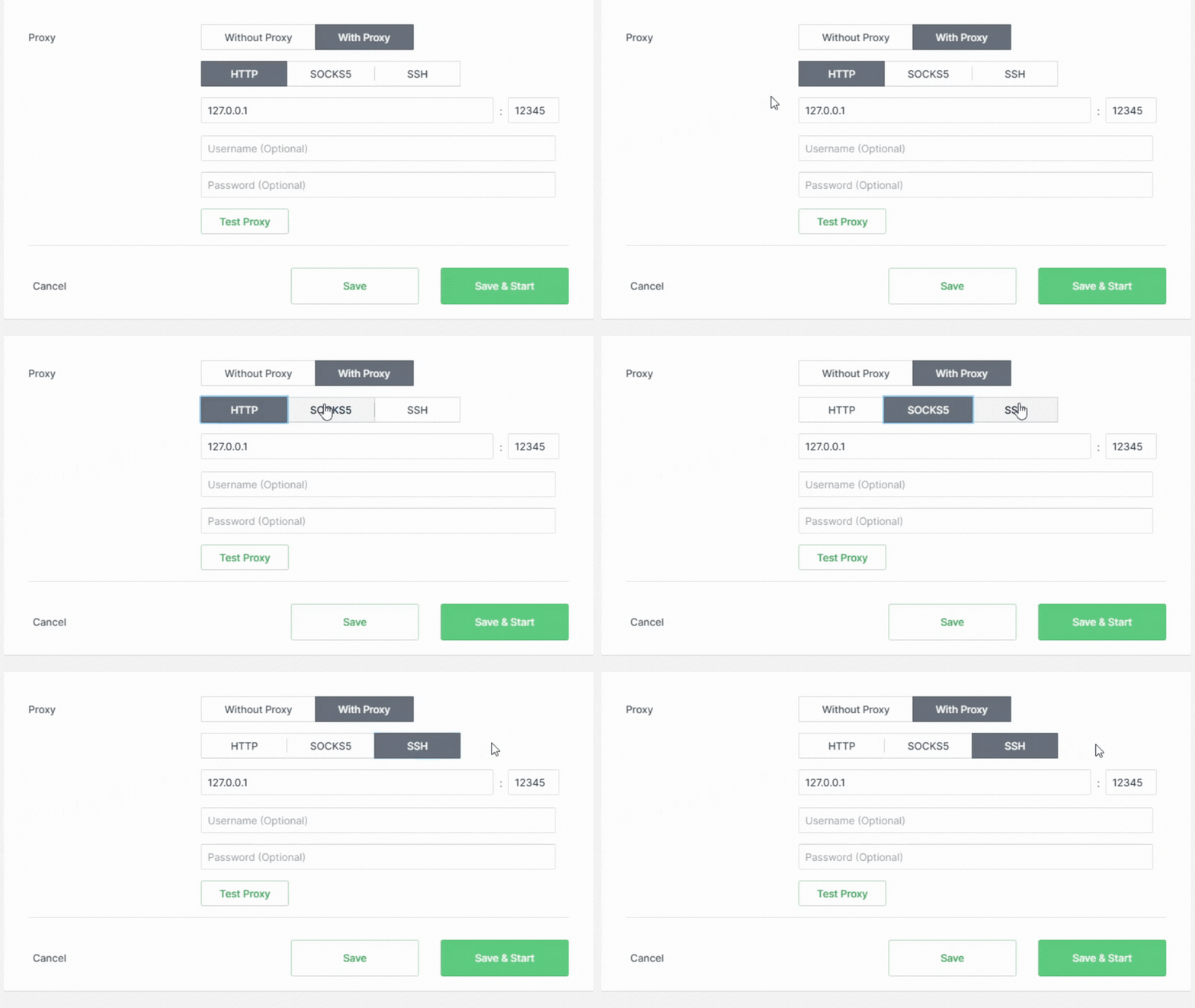 Add a FonProxy proxy — host, port, username, password.
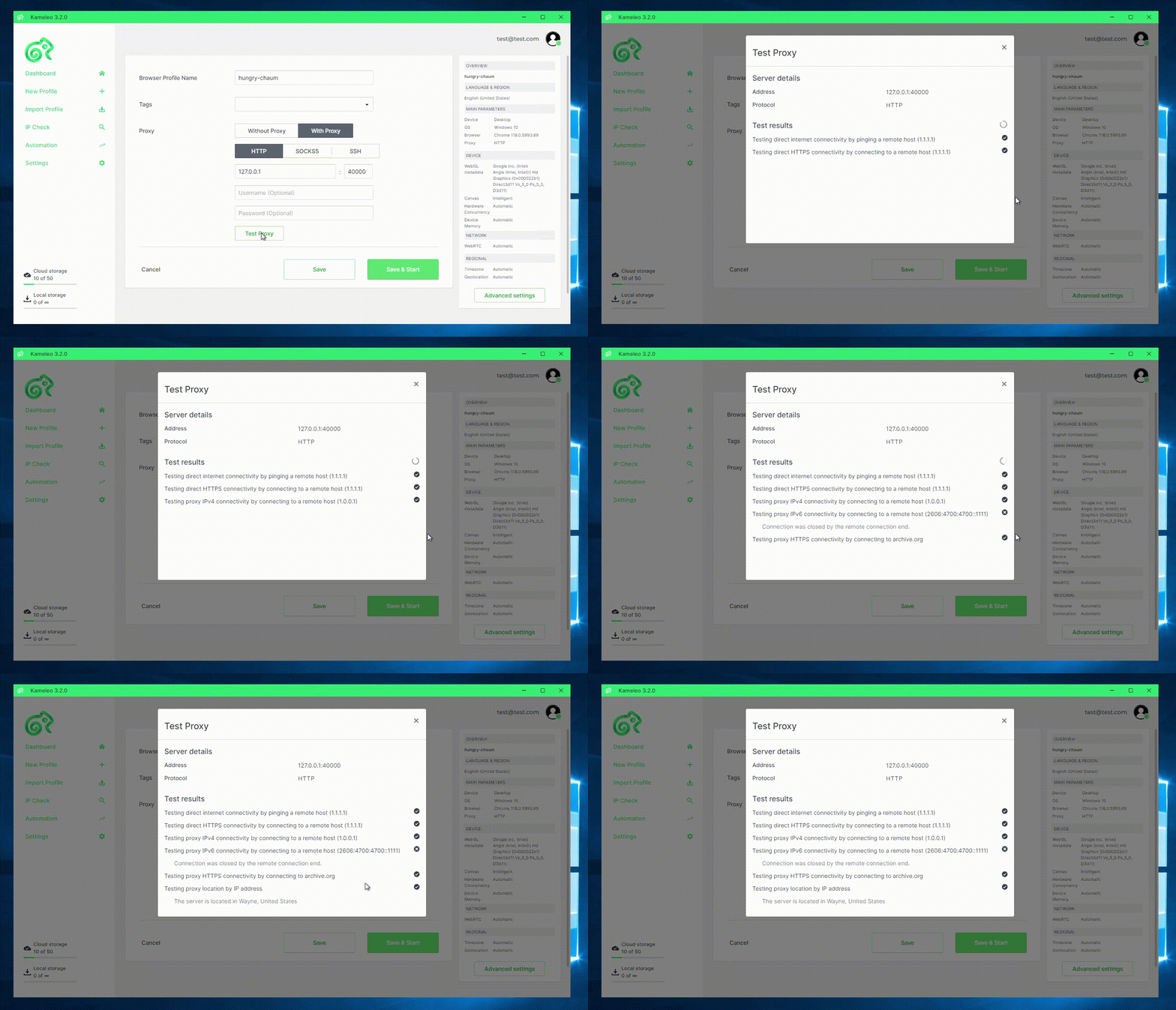 The built-in test confirms the proxy works before you launch the profile.
Add a proxy to a new profile
-
In Kameleo, start a new profile from the dashboard.
-
Choose the device type, operating system, browser and language. Pick a language that fits the proxy country, for example English (United Kingdom) for a
-c_gbproxy. -
Find the proxy section of the profile settings. By default it is set to Direct connection (No proxy).
-
Change the proxy type to HTTP or SOCKS5, matching the protocol you use in FonProxy.
-
Fill in the fields:
- Host:
fon.ac - Port:
20001 - Username and Password: your FonProxy login.
You can also paste the full
username:password@host:portline. Kameleo splits it into the fields. It guesses the proxy type from the port, so check the type after pasting and set it back to the one you want. - Host:
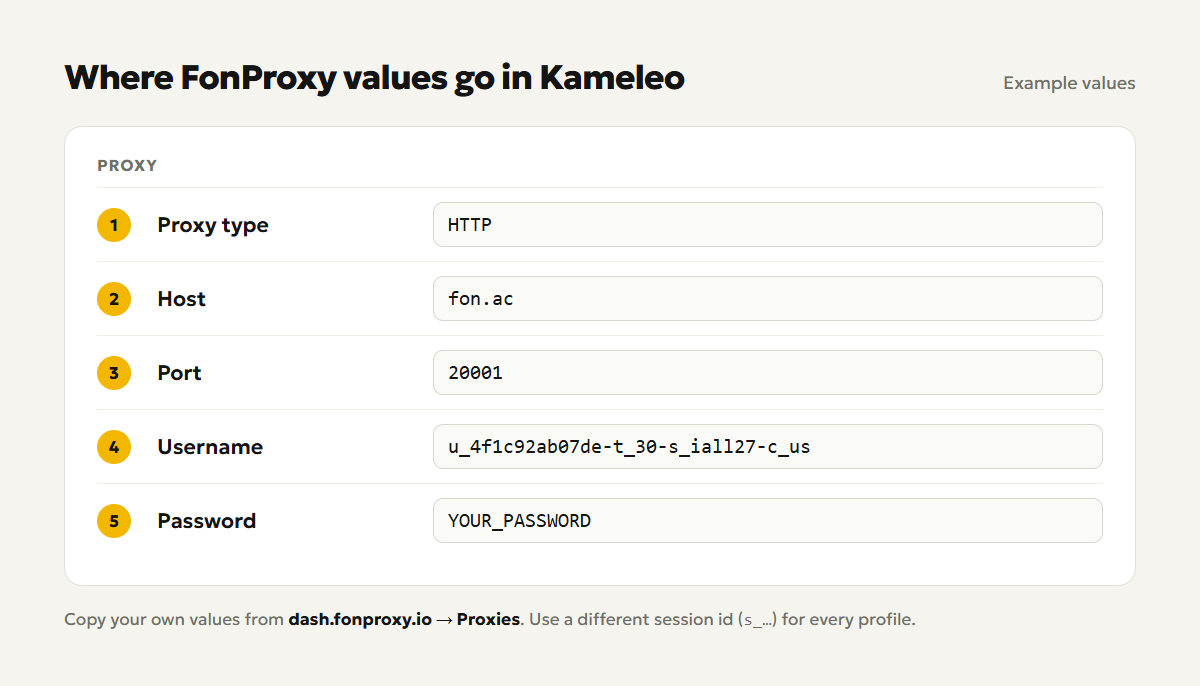
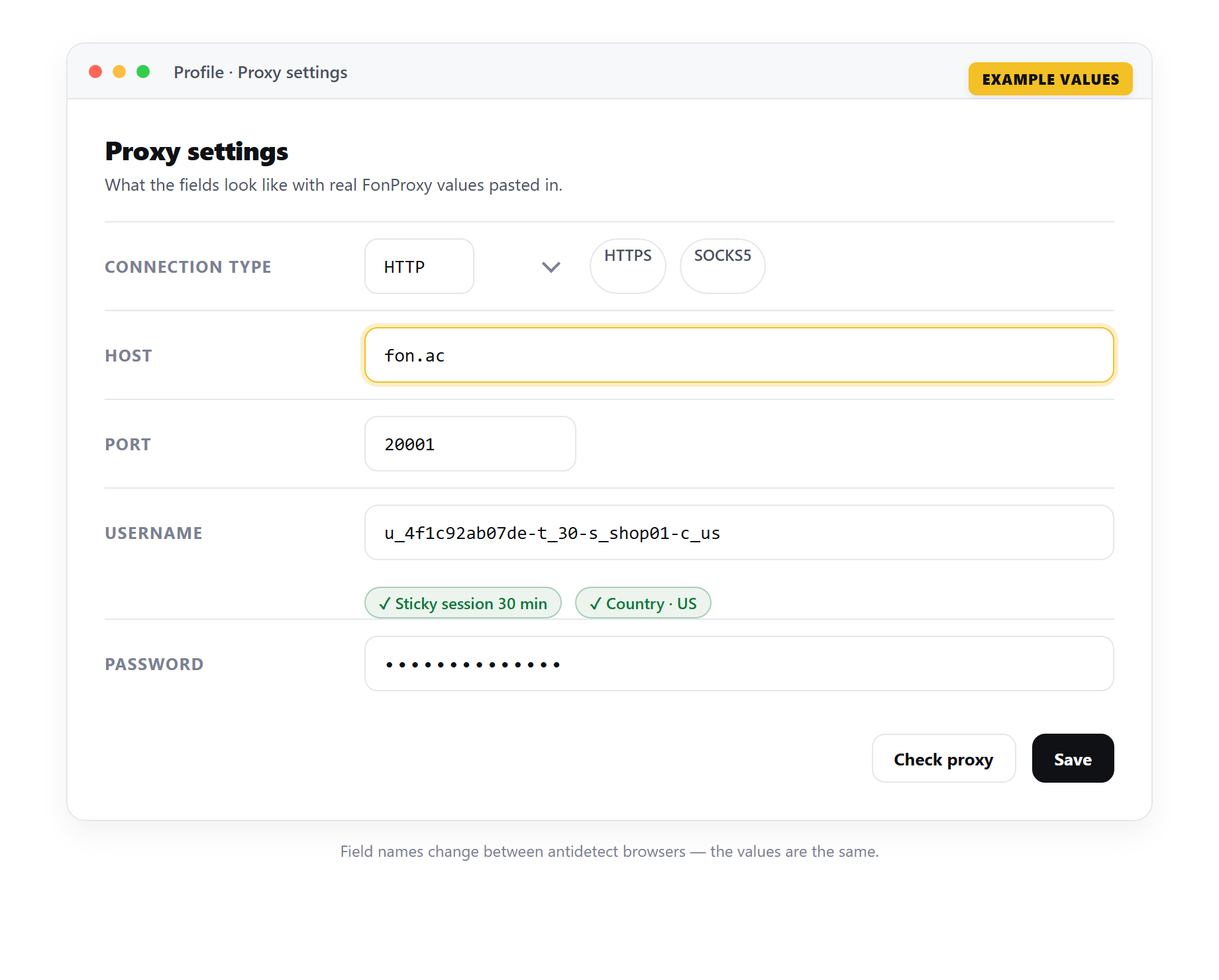 Example only — the field names change between antidetect browsers, but the FonProxy values stay the same.
- Click Test Proxy.
- When the test passes, save the profile.
If most of your profiles use the same proxy settings, put them in the Default Proxy Settings section of Kameleo's settings. New profiles start with those values, and you only change the session id.
Check the connection
Test Proxy tries to reach Google, Archive.org and Wikipedia through the proxy, one after the other. If any of them loads, the test passes. FonProxy does not block these sites, so a failed test points to a wrong value.
Then check from inside the profile:
- Start the profile.
- Open an IP check site, such as browserleaks.com or whoer.net.
- Confirm the IP is not yours and the country matches your username.
- Compare the timezone and location the site reports with the IP's country.
Many profiles: one proxy line per profile
Kameleo's help center does not describe a bulk proxy import into existing profiles. Kameleo does accept a full connection string per profile, which keeps the work fast. Prepare one line per profile, each with a different session id:
u_4f1c92ab07de-t_60-s_jp01ab-c_jp:YOUR_PASSWORD@fon.ac:20001
u_4f1c92ab07de-t_60-s_jp02cd-c_jp:YOUR_PASSWORD@fon.ac:20001
u_4f1c92ab07de-t_60-s_jp03ef-c_jp:YOUR_PASSWORD@fon.ac:20001
A simple routine:
- Set Default Proxy Settings to your most common country and protocol.
- Create a profile, paste one line from the list, and run Test Proxy.
- Open the three-dot menu of a finished profile and choose Duplicate. Open the copy and paste the next line into its proxy fields, so it does not keep the original's session.
- Note which session id belongs to which profile, so you can reuse it later.
For static IPs, use one line per IP with its own port and the plain base username.
If you manage hundreds of profiles, Kameleo's Local API can create profiles with a proxy from a script. See the Kameleo developer docs for that.
Match timezone, language and geolocation
Kameleo can take these values from the proxy. They live in the Location section under Advanced Settings when you create or edit a profile.
- Timezone: keep it on Automatic (Recommended). Kameleo sets the timezone to the proxy's location. Manual lets you pick one yourself. Off shows your real timezone.
- Geolocation: keep it on Automatic (Recommended) as well. With Manual, enter coordinates inside the proxy's country. Block stops sites from reading location, which can look unusual.
- WebRTC: keep it on Automatic so it fits the proxy IP and does not leak your real one.
- Language: this is not set from the IP. Choose it yourself to fit the proxy country.
Two more tips from Kameleo's own advice. Do not switch the proxy while a profile is running; stop it first. And if you must change a profile's proxy, stay in the same region.
Troubleshooting
| Symptom | Fix |
|---|---|
| Auth failed or 407 error | Copy the login again from the dashboard. Check for spaces. Each suffix needs a leading dash, as in -c_us. If the password has special characters, they may need URL encoding in a pasted string. |
| Test Proxy fails or times out | Check the host fon.ac and the port. After pasting a line, confirm the proxy type was not changed to the wrong protocol. |
| Wrong country | Check the -c_ code. For static IPs, check the port. Then confirm the timezone is set to Automatic. |
| IP changes mid-session | Add -t_<minutes>-s_<id> to the username. Use t_60 for longer sessions, or a static IP for multi-day use. |
| Works only on one computer | The IP whitelist is in use. Add the other computer's IP in the FonProxy dashboard, or use username and password. |
Frequently asked questions
Which connection string does Kameleo accept?
The username:password@host:port format. FonProxy's dashboard gives you this line with one click.
Can several profiles share one session id?
They would share one IP, which links them. Give each profile its own id.
Do I need to set the timezone by hand?
No. With Automatic, Kameleo follows the proxy IP. Ready to try it? Get a free FonProxy test (https://fonproxy.io/en/test) and set up your first Kameleo profile.
Try it with a free FonProxy test
Spin up a FonProxy proxy and set up your first Kameleo profile in a few minutes. Open a free test or jump to the pricing.
Comments 0
Log in to your FonProxy account to join the discussion.
Log in to commentNo comments yet. Be the first to share your experience.