
Octo Browser is an antidetect browser. It lets you run many browser profiles side by side, each with its own fingerprint, cookies and storage. But a profile is only as separate as its connection. If ten profiles share one IP, a website can link them in seconds. A proxy per profile fixes that: each identity gets its own address in the country you choose.
This guide walks you through adding a FonProxy proxy to an Octo Browser profile, checking it, scaling up and matching the browser settings to the IP.
Before you start
You need:
- Octo Browser installed and signed in.
- A FonProxy proxy. See the pricing page, or start with the free test.
- Your proxy details from the FonProxy dashboard, under Proxies. Use the copy buttons to get full lines.
Which product to pick:
- Rotating residential with a sticky session. Best for many profiles across many countries. You set the country and hold one IP per profile through the username.
- Static IP (static/ISP, private or mobile per-IP). Best when an account should log in from the same IP for a long time. Each IP has its own port and keeps its country for the whole period.
Get your FonProxy credentials
Open the FonProxy dashboard. Every proxy you own is one row — host, port, username and password. Hit Copy next to it and you are set.
- Host & port — the same host for all proxies, a different port per proxy.
- Username — your base username, with country or sticky-session suffixes if you need them.
- Password — unless you added your IP to the FonProxy whitelist, in which case leave it empty.
Build the proxy login
All FonProxy proxies use one host. The port and username come from your dashboard.
| Field | Example value |
|---|---|
| Host | fon.ac |
| Port | 20001 (one port per proxy, starting at 20001) |
| Username | u_4f1c92ab07de-t_30-s_iall27-c_us |
| Password | YOUR_PASSWORD |
For rotating products, you control the IP by adding parts to your base username (u_4f1c92ab07de):
- Country:
-c_with a two-letter ISO code:-c_us,-c_gb,-c_de,-c_br,-c_jpand so on. Skip it for any country. - Sticky session:
-t_<minutes>-s_<sessionid>. Minutes are 15, 30 or 60. The session id is a short string you make up, such asiall27. - With no
-t_..-s_..part, you get a new IP on every request. Logged-in accounts do not like that, so keep a session in every profile.
The rule for antidetect profiles: one sticky session per profile, a different session id for each one, and the country that matches the account.
For IP products, use the base username with no suffixes and the port of the IP you want.
FonProxy works over HTTP, HTTPS and SOCKS5. Instead of a password you can sign in by IP: add your IP to the whitelist in the FonProxy dashboard.
Step by step with screenshots
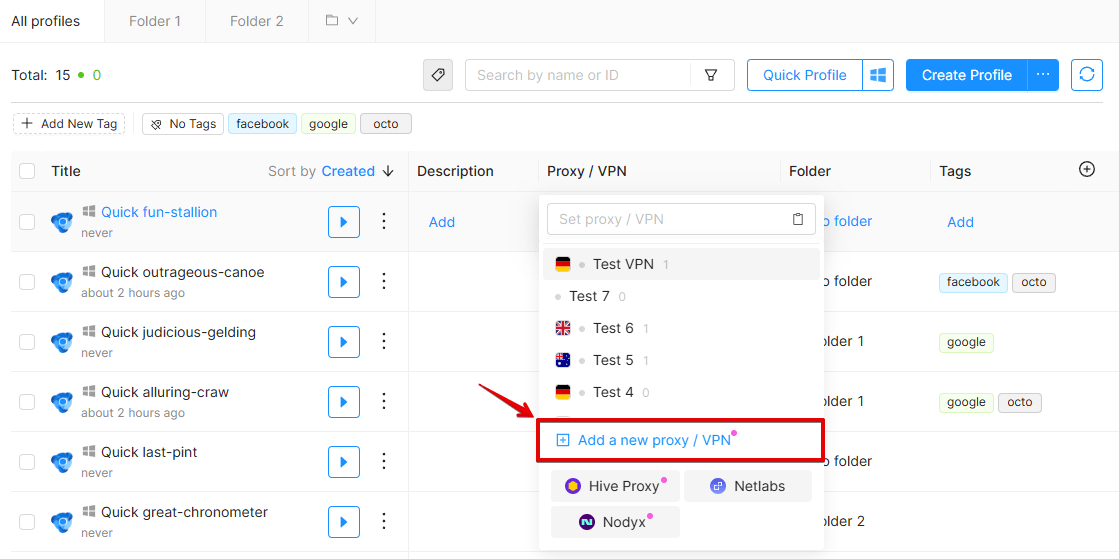 Set Temporary Proxy — the fastest way to try a FonProxy line.
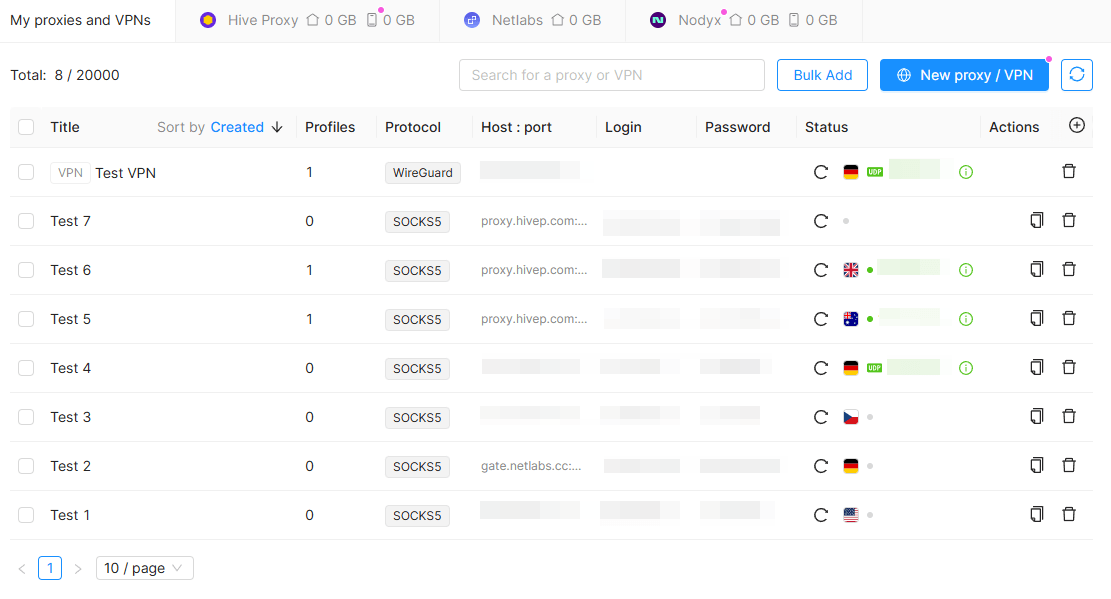 Save a proxy to Proxy Manager to reuse across profiles.
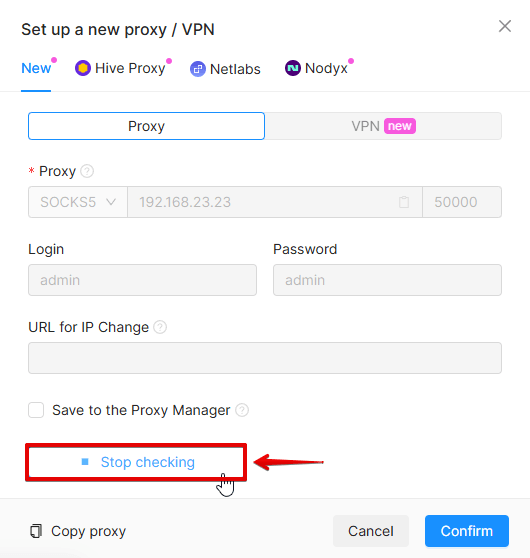 Octo checks the proxy on save and reports pass/fail.
 Keep timezone, language and WebRTC aligned to the proxy IP.
Add a proxy to a new profile
- Open Octo Browser and click Create Profile.
- Enter a Profile Name, for example
shop-us-01. Choose the OS now, because you cannot change it after the profile is saved. - Click the Proxy / VPN field. By default it says Set proxy / VPN, which means a direct connection.
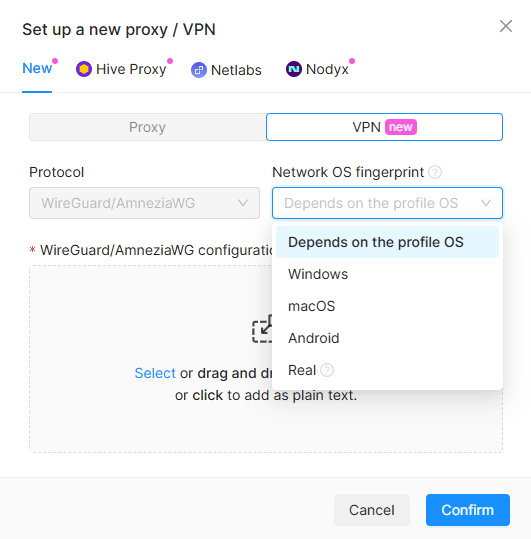
- Choose to set a new proxy. Select the type: HTTP or SOCKS5 both work with FonProxy. Octo's own docs recommend SOCKS5.
- Fill in the fields: host
fon.ac, port20001, loginu_4f1c92ab07de-t_30-s_iall27-c_us, passwordYOUR_PASSWORD. A faster way: copy a line from the FonProxy dashboard and paste it into the Host field with Ctrl+V. Octo splitshost:port:login:passwordorlogin:password@host:portinto the right fields.
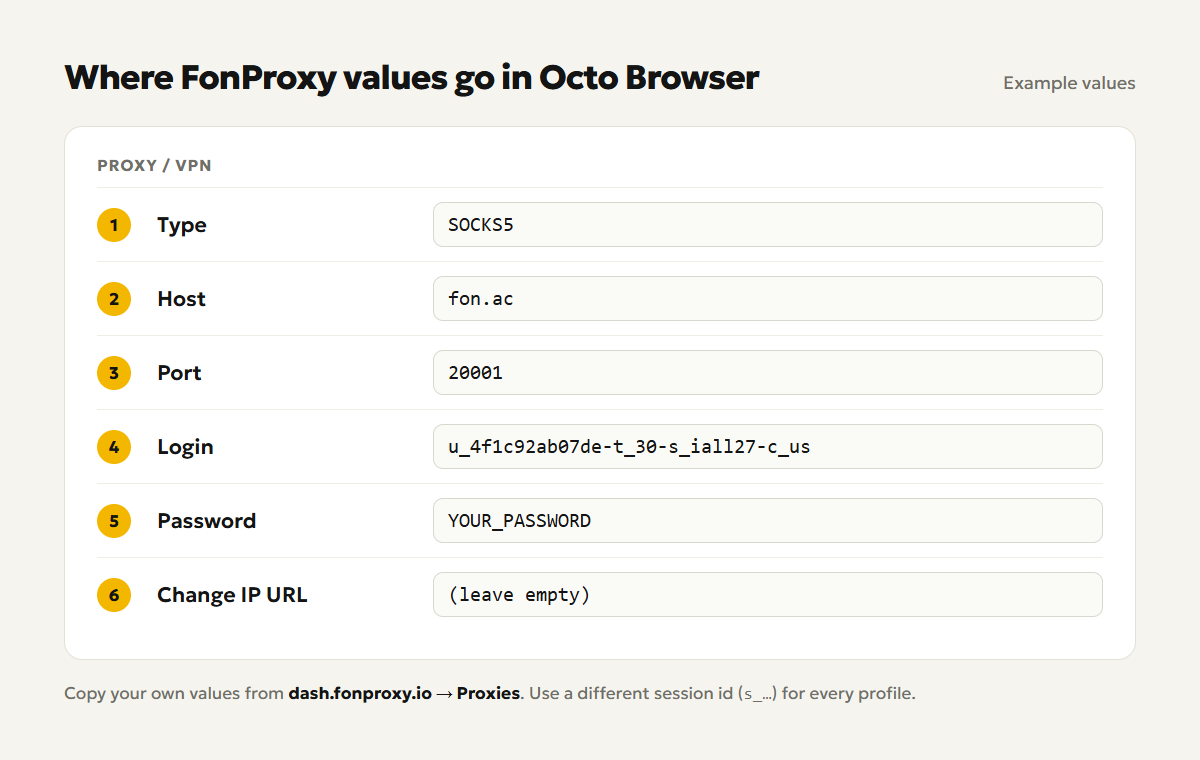
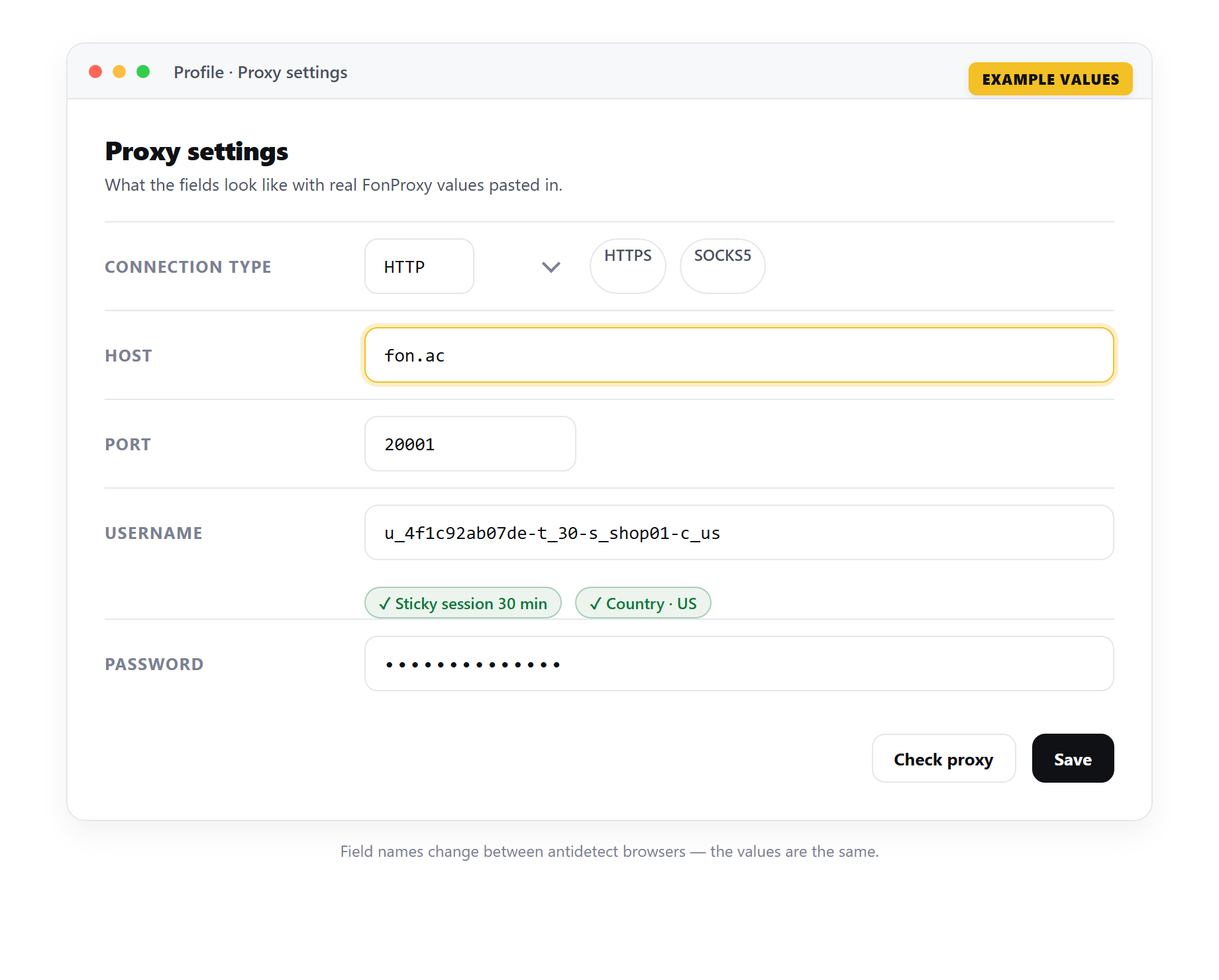 Example only — the field names change between antidetect browsers, but the FonProxy values stay the same.
- Leave Change IP URL empty. FonProxy changes the IP through the session id, not a link.
- If you want to reuse this proxy, tick Save to the Proxy Manager and give it a name. Leave it unticked to keep it as a temporary proxy for this profile only.
- Save the profile.
To change the proxy later, click the three dots next to the profile and choose Edit profile. If the profile is running, the change applies after a restart.
Check the connection
First, use Octo's checker. In the proxy window, click Check proxy. A green Available status with a country flag means it works. A red Unavailable status means it does not.
Then check from inside the profile:
- Select the profile and click Start. Octo checks the connection again on launch.
- Open any IP check website in the profile.
- You should see an IP in your chosen country, not your own.
- Reload after a few minutes. With a sticky session the IP stays the same.
If a proxy you know works shows as unavailable, your internet provider may block the checker. Try another network, such as a phone hotspot.
Many profiles at once
Octo has a Bulk Add feature in the Proxy Manager. Paste a list, one proxy per line, or drop in a file. You can set a name prefix so the proxies are named prefix #1, prefix #2 and so on. Lines with a mistake are marked ERROR.
Octo expects the protocol at the start of each line. Here are three sample lines, each with its own session id:
socks5://u_4f1c92ab07de-t_30-s_k3m9qa-c_us:YOUR_PASSWORD@fon.ac:20001
socks5://u_4f1c92ab07de-t_30-s_p7x2lb-c_us:YOUR_PASSWORD@fon.ac:20001
socks5://u_4f1c92ab07de-t_30-s_w5d8rt-c_us:YOUR_PASSWORD@fon.ac:20001
Use http:// instead of socks5:// if you prefer HTTP.
You can also create profiles in bulk: click the three dots next to Create Profile and choose Bulk Create. To import profiles with their proxies from a .csv, .txt or .xlsx file, click Download Template first and follow its column order. Put one proxy line in each row.
Another option is a profile template with several proxies. Each profile made from the template gets one of them at random. Make sure there are at least as many proxies as profiles, or two profiles may land on the same IP.
Match timezone, language and geolocation
A US IP with a browser that reports a Berlin timezone is a red flag. Octo handles this for you by default:
- Languages: set from the external IP.
- Timezone: matched to the IP location and updated on every launch.
- Geolocation: matched to the IP location. Websites still have to ask before they get it.
Leave these on their IP-based defaults. For WebRTC, keep the option based on IP so websites see the proxy IP and not your real one.
If you set any of them manually, use values that fit the proxy country.
Watch it in the app
The Octo Browser team has an official video that walks through the same screens. Use the FonProxy values from the table above wherever the video enters proxy details.
Video: Configuring Proxies - Octo Browser Tutorial
Troubleshooting
| Symptom | Fix |
|---|---|
| Auth failed or HTTP 407 | Copy the login and password again from the dashboard. Check for extra spaces and that suffixes are joined with -. |
| Timeout or Unavailable | Check the host fon.ac and your port. Try SOCKS5 instead of HTTP. Try another network in case yours blocks the checker. |
| Wrong country | Check the -c_ code. Use ISO codes, for example gb. For IP products the country is fixed per IP, so use the port of the right IP. |
| IP changes mid-session | Add -t_30-s_<id> to the login. When the sticky time ends, the IP can change; use 60 minutes for long sessions. |
| Whitelist login works on one PC but not another | Whitelist sign-in only accepts listed IPs. Add this computer's public IP in the FonProxy dashboard, or use login and password. |
Frequently asked questions
Temporary proxy or Proxy Manager?
A temporary proxy belongs to one profile. The Proxy Manager is better when you reuse proxies or manage many.
HTTP or SOCKS5?
Both work. SOCKS5 is a good default. Switch if one is blocked on your network.
How do I get a new IP for a profile?
Change the session id in the login, for example from s_iall27 to s_iall28, and restart the profile.
Can I use the same line in two profiles?
Then both use the same IP. Give each profile its own session id. Want to test first? Grab a proxy from the free test (https://fonproxy.io/en/test) and set up your first Octo Browser profile.
Try it with a free FonProxy test
Spin up a FonProxy proxy and set up your first Octo Browser profile in a few minutes. Open a free test or jump to the pricing.
Comments 0
Log in to your FonProxy account to join the discussion.
Log in to commentNo comments yet. Be the first to share your experience.